






Highlights

Massive LED Array

High-Speed Strobe

6 Operating Modes

Sound-Activated Sync

Dimensions

Weight
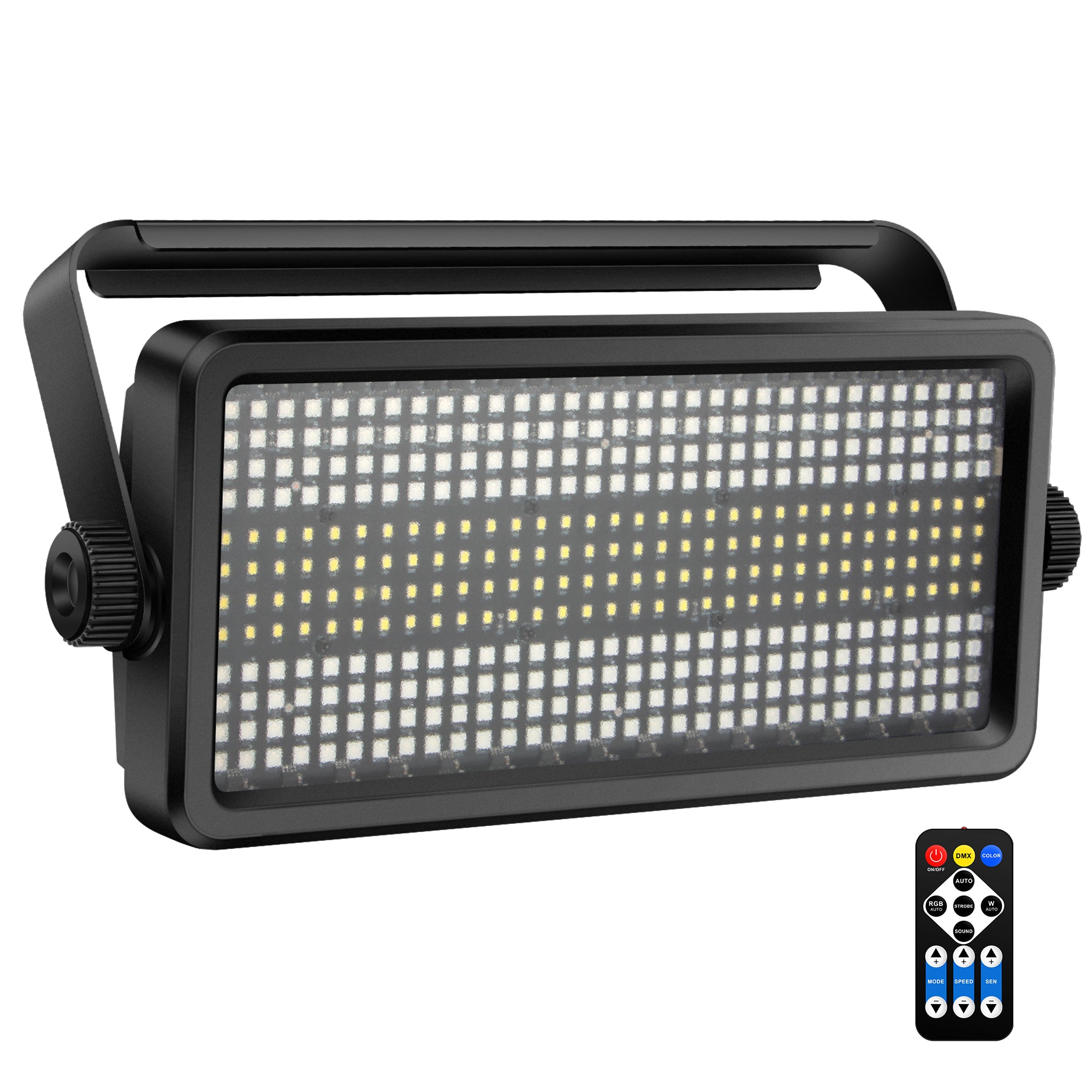
150W RGBW Stage Strobe Light
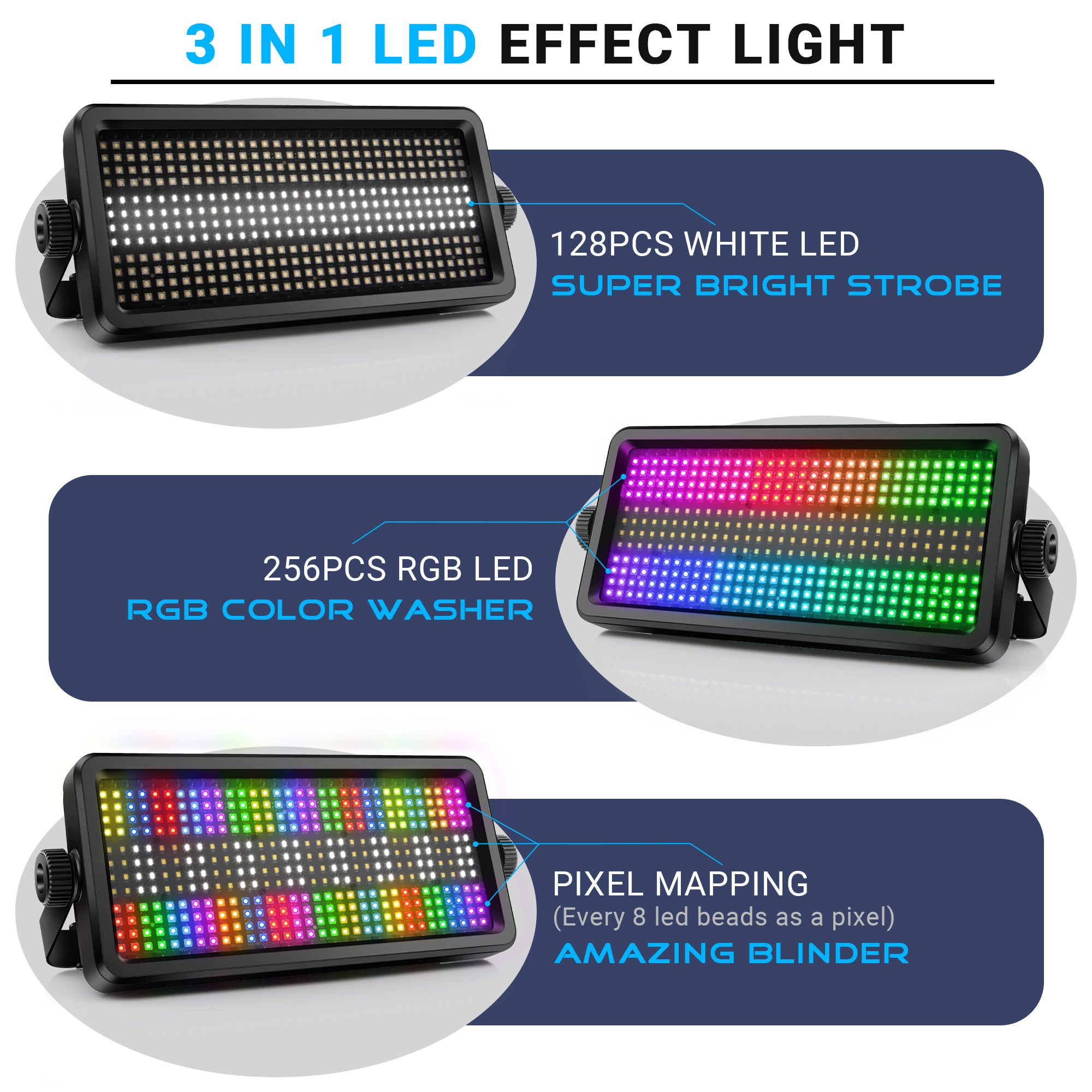
Blinding strobe meets full-color wash in one compact panel. The YeeSite 150W Stage Strobe Light packs 256 RGB and 128 cool white LEDs across 48 controllable zones. 230+ built-in programs, 3 DMX modes up to 112 channels, IR remote, and sound-activated sync — ready to own the room.
Highlights
Massive LED Array
High-Speed Strobe
6 Operating Modes
Sound-Activated Sync
Dimensions
Weight

Pairs well with
Free Shipping from U.S. Stock
30-Day Money Back Guarantee
CE & RoHS Compliant
24-Month Warranty
150W RGBW Stage Strobe Light
If you have any questions, you are always welcome to contact us. We'll get back to you as soon as possible, within 24 hours on weekdays.
- Email: support@yeesiteelec.com
- Phone: (626) 474-4275
- Live chat: click on the chat bubble on the bottom left.
-
Shipping Information
All our items are shipped from the U.S. stock, arriving at your doorstep in up to 8 days at no extra cost. You can always opt in for Priority Shipping ($19.99) or Express Shipping ($49.99) to shorten the transit time and get your orders delivered in as fast as 1 business day.
For more details, check our shipping policy.
-
Compliance Notice
Our products are designed to meet applicable CE and RoHS requirements. Specifications and features may vary by model and are subject to change. Professional installation and proper usage are required.
-
Warranty Info
Yeesite products are covered by a 24-month limited warranty from the date of purchase against manufacturing defects under normal use. This warranty covers defects in materials or workmanship, but does not apply to damage caused by improper installation, misuse, unauthorized modification, normal wear and tear, or operation outside of recommended specifications. Warranty service may include repair or replacement at Yeesite’s discretion, and proof of purchase is required.
-
Refunds & Returns
Eligible items may be returned within 30 days of delivery. Once approved, Yeesite covers all return shipping costs and no restocking fee applies. Refunds are issued after inspection.
For more details, check our refund policy.
Dive Deeper
Tech Specs
Installation, Cleaning & Maintenance
Compliance & Certification
The 150W RGBW Stage Strobe Light is designed to comply with applicable CE and RoHS requirements.
In The Box

The Light

Installation Kit

Bracket

Power Cable

Remote

User Guide


Free shipping and returns
FAQs
Please read our FAQs page to find out more.
How many DMX channels does the unit use?
Can I link multiple units for a synchronized light show?
How many built-in programs does this fixture have?
Can I create custom static colors?
This rather amusing little light is exceedingly bright with some of the truest colors I've seen, especially in a light at this price point. It has some great presettings, if you don't want to deal with the DMX, It has several automatic settings which makes it so simple almost anyone can use it. The light also has excellent sound response. The strobe effects are fantastic, and the included remote accesses that pretty well. DMX control can get pretty detailed pretty fast. That said, if you don't already have a DMX controller, this might be the light to get one for. They're pretty cheap now, somewhere between 50 and 100 bucks for a decent low end controller, and you could really open up the possibilities of this little light. A light like this would have gone for thousands of dollars just a few years back. I'd recommend getting one now while you can. Maybe more than one. It's definitely worth the current low cost


My dad is a wedding DJ and always looking for good lights, effects, etc. I got him this for Christmas and he loves it. He said this is very well made and although its lightweight, its very durable. I love that it comes with a remote so you can control the settings as well as the color options. This is great for large parties, weddings, etc. Very good quality and worth the price. Would recommend.

I bought this light for my mancave and gameroom, not for DJ work or events, and it ended up being way more capable than I expected. I wanted something that could add mood lighting behind my gaming setup, arcade machines, and wall displays without looking cheap or gimmicky. This absolutely delivers.The first thing that surprised me was how much light it puts out. Even when dialed back, it fills the room evenly and makes the whole space feel larger and more immersive. I mounted it high on the back wall, aimed it upward, and it creates a smooth color wash that looks fantastic during gaming sessions or movie nights. It does not produce harsh hotspots or eye fatigue, which was a big concern for me.Build quality feels solid. This is not flimsy plastic lighting meant to last a few months. It feels like something designed to be mounted and forgotten about. Once it is in place, it just works. Heat management has also been good so far. Even after hours of use, it does not get worryingly hot, which matters in a closed room full of electronics.I am not running DMX in my gameroom, and that was not a problem at all. The included remote makes it easy to change colors, brightness, and effects depending on what I am doing. Subtle colors for gaming, slow transitions for ambient lighting, or more aggressive effects when friends are over. It adapts easily without feeling complicated.If you are building a mancave, gaming room, or home hangout space and want lighting that feels intentional and immersive instead of decorative junk, this is a great choice. It adds atmosphere without stealing attention, and once you have it installed, you will wonder how the room ever felt complete without it.
First I'll start out by saying this light is nice and bright and each color renders very nicely. It's lightweight plastic, With a pretty standard metal mounting bar So you can hang it from a truss or other lighting rig. The strobe function works as intended and is variable for speed. The unit is plenty bright for an average size room. This is a DMX controlled unit I would highly recommend only trying to run this on a DMX board of decent size. This unit has a lot of channels, However, most of the channels are just fluff. A lot of the channels are just unnecessary patterns and chases within the lamp, which really contribute nothing to the value of the lamp. When we use lamps like this it's to be able to shine out onto an audience or to light something up in a specific color not to stare into the bulb to see what the patterns of the bulbs are doing. Because this lamp focuses so much on the color patterns of the bulbs, there are so many DMX channels assigned to just that function, which makes it incredibly bulky to load into any DMX setup. If they removed most of the fluff, which are all the chases and patterns in the bulbs themselves, they could reduce this down to a 6, 8 or a 10 channel DMX light which would be far more user friendly and still give you everything that you actually need to use as a DJ or on a stage. This is kind of a weird combination of stage blinder and DMX par light. It's powerful enough to be a really really nice par light, But with all the added fluff it appears as if it was intended to be some kind of colored audience blinder. Overall it's just a lot of unnecessary channels and unnecessary features. I just want to make the dance floor red or green or strobe or whatever color and nobody's dancing and actually staring at the light bulb to see the patterns on the bulbs. It's like all these features were added just to be able to hype up all the features of the light, but all it did was add so many extra channels that aren't necessary that the typical DJ or stage lighting set up is going to quickly run out of channels on your universes because of all these channels that are essentially worthless fluff. I'm still going to rate it a 4 star despite all that because it is a very nice strong light and has very nice true colors, I just think to make it a really 5 star product they needed to trim some of the unnecessary DMX channels out of it - its just too many unnecessary gimmicks
Party lights are SO FUN!This one is for sure. The features of this light are amazing!I love love LOVE that you can daisy chain multiple ones together to work with your professional programming modes.And WOW, the professional things you can do with this, with mixing and mastering and so much music and beats and different light effects, and SO MUCH MORE!I also love that it comes with a LOT of pre-programmed light settings. That is just so cool. Sometimes, you just can't think of what to do, so having those programmed in makes it super easy to use it for a smaller event to just add to the atmosphere for sure.When you have the strobe and lighting effects going along with music, it is just super awesome. But, just having the fun flashing lights also adds to any party. The different colors available means that you can use it very specifically for different themes, holidays, and more!I love how well made this unit is! The materials are all very high-quality and are really durable. It is easy to install in different ways, or just use the handle to prop it up. I love that! It is very durable and can be tossed around quite a bit without damaging anything.The instructions for use are really awesome. They give lots of ides of what to do and how to use it. They are clear and easy to understand, so this can be for the professional, or for the beginner, or just for a fun family party here and there!It has so many features and you will be so very happy with it!It is just a really fun light!
Ultimately, the quality and brightness of the strobe with its variety of auto programs helped it keep 5 stars. I like the twist lock power cord and included mounting bracket. All was well made with quality materials. On the quirky side, while the remote gives you access to many of the light’s features, everything has to be on full 150W brightness as there is no brightness control on the remote. The DMX control gives plenty of flexibility with overall or individual color brightness. Also, in the instructions, it says pressing Strobe and Mode + will cancel strobe. I tried all kinds of ways of pressing those two (along with mode and sens + and -) with no luck. The only way I found to turn off strobe on the remote once you have turned it on is to put the light in Strobe mode and keep tapping the minus on Speed until it slows all the way down to “no strobe”. Again, with DMX, there are good options for setting strobe speeds that work just fine.So, overall a great well-built strobe light with remote, DMX and on-board menu setting options. If you want to just turn it on and set an auto mode, this would be a great attention-getter right out of the box. Also, the sound mode with sensitivity options works very well and is very responsive to the beat of the music.
This review is for the "LED Stage Strobe Effect Light - OPPSK 150W RGBW DJ Light with 48 Zones Chasing by Remote DMX Control Sound Activated Auto Play Uplight for Event Concert Party Church Wedding Club Christmas Lighting."If you are going to set this up with your dmx software, there is a lot to program when using the high channel count but your universe will fill up quickly. You can access each LED with no issues, or program it with the lower channel count to access pre-programmed settings. If you don't want to use the dmx feature, you can control the light to some extent with a supplied remote control. Sound triggering is sensitive enough to use in moderate volume environments unlike some sound activated lighting that needs high volume sound to trigger. The sound sensitivity is adjustable too.Yes, this is a really bright wash light and I don'trecommend looking straight at it. It's pretty well made too, and has a nice long bracket for mounting almost anywhere. Color reproduction is actually pretty good considering this is a budget dmx light array block. Even the yellow is close to yellow. Some cheap lighting out there tries to reproduce yellow but instead you get some off-greenish color. This one has an acceptable yellow reproduction.It doesn't get super hot as the heatsink array behind it does an adequate job dissipating heat. Overall, this is a decent dmx light wash array for the price. Worthy of recommendation for moderate use such as in parties, weddings, small venues, etc.